For small and medium businesses, the biggest barrier to digital transformation is rarely willingness — it's cost. Traditional ERP systems like SAP and Oracle demand licensing fees that can easily reach hundreds of thousands or even millions of dollars, putting them well out of reach for most SMEs. And the free alternatives? They tend to be feature-incomplete, stuck with outdated interfaces, and poorly maintained.
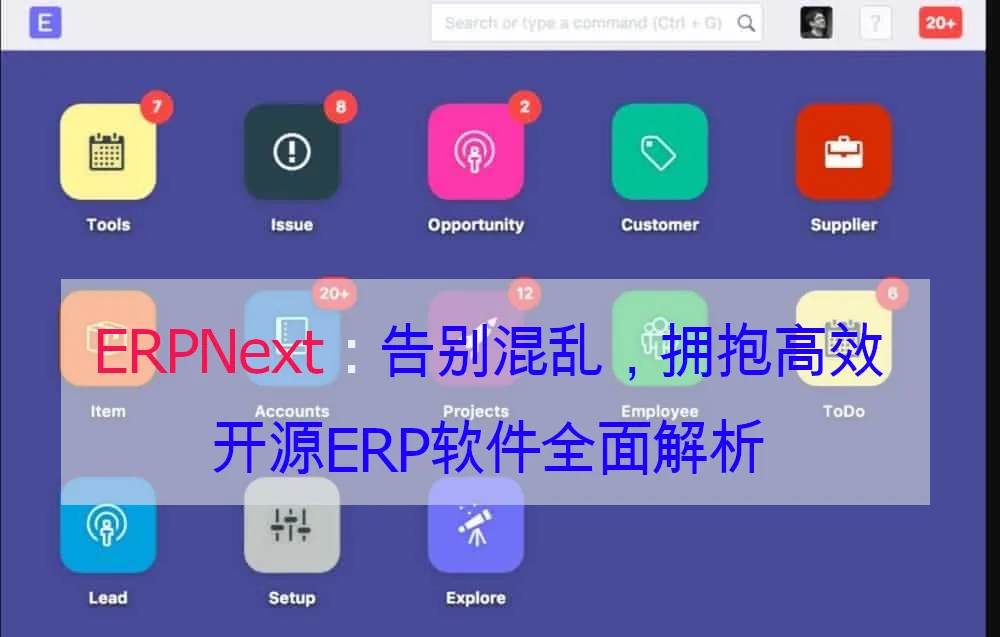
ERPNext changes that equation. As a 100% free and open-source enterprise resource planning system, ERPNext delivers a complete solution covering finance, CRM, sales, purchasing, inventory, manufacturing, human resources, and more. Built on the Frappe framework with a Python + JavaScript tech stack, it features a modern web UI and powerful customization capabilities.
This guide takes you from scratch through ERPNext installation, basic configuration, core module usage, and hands-on secondary development — helping you quickly set up an enterprise-grade ERP system tailored to your business.
What is ERPNext?
ERPNext is an open-source ERP system developed and maintained by the Indian company Frappe Technologies, released under the GNU General Public License (GPL) v3. This means you can:
- ✅ Use it for free — no licensing fees whatsoever
- ✅ Modify it freely — customize features to match your business needs
- ✅ Use it commercially — deploy in production with no user limits
- ✅ Community-driven — an active global community continuously contributes code and plugins
Architecture
┌─────────────────────────────────────┐
│         ERPNext (Application Layer)   │
│  Finance | CRM | Sales | Purchasing | Inventory | HR  │
├─────────────────────────────────────┤
│       Frappe Framework (Framework)    │
│  DocType | REST API | Permissions | Workflow    │
├─────────────────────────────────────┤
│  Python (Backend) | MariaDB (Database)     │
│  JavaScript/Vue (Frontend) | Redis (Cache) │
└─────────────────────────────────────┘
At the heart of ERPNext lies the Frappe Framework, a full-stack web application framework written in Python. Frappe's standout feature is its low-code/no-code capability — by defining DocTypes (document types), you can rapidly create data models, forms, list views, and APIs without writing large amounts of code.
Why Choose ERPNext?
| Dimension | ERPNext | Odoo (Community) | SAP Business One |
|---|---|---|---|
| Licensing | Free (GPL v3) | Community free, core modules paid | $10K–$100K+/year |
| Open Source | 100% open source | Open core (some modules closed-source) | Closed source |
| User Limits | Unlimited | Community: unlimited | Per-user pricing |
| Tech Stack | Python + MariaDB | Python + PostgreSQL | Proprietary |
| Customization | Frappe framework, low-code | Requires Python dev skills | Certified developer required |
| Chinese Support | Native support | Community translation | Official support |
| Deployment | Self-hosted / Frappe Cloud | Self-hosted / Odoo.sh | On-premise / Cloud |
| --- |
Installation & Deployment
ERPNext supports multiple deployment options. This section covers the three most common approaches: Docker deployment (recommended), manual installation, and Frappe Cloud hosting.
Option 1: Docker Deployment (Recommended)
Docker deployment is the simplest and cleanest installation method, suitable for both quick testing and production environments.
System Requirements
- CPU: 2 cores or more
- Memory: 4GB+ (8GB recommended)
- Storage: 20GB+
- OS: Ubuntu 20.04/22.04, CentOS 8+, Debian 11+
One-Click Deployment with docker-compose
# 1. Install Docker and Docker Compose
curl -fsSL https://get.docker.com | sh
sudo systemctl enable --now docker

# 2. Install Docker Compose (if not already included)
sudo apt install docker-compose-plugin

# 3. Clone the official docker-compose configuration
git clone https://github.com/frappe/frappe_docker.git
cd frappe_docker

# 4. Create the environment file
cp example.env .env

# Edit .env and set these key parameters:
# SITE_NAME=erp.yourdomain.com
# DB_ROOT_USER=root
# DB_ROOT_PASSWORD=your_secure_password
# ADMIN_PASSWORD=your_admin_password

# 5. Start the services
docker compose -f compose.yaml \
  -f overrides/compose.mariadb.yaml \
  -f overrides/compose.redis.yaml \
  -f overrides/compose.noproxy.yaml \
  config > ~/docker-compose.yml

docker compose -f ~/docker-compose.yml up -d

# 6. Create a new site
docker compose -f ~/docker-compose.yml exec backend \
  bench new-site erp.yourdomain.com \
  --mariadb-root-password your_secure_password \
  --admin-password your_admin_password \
  --install-app erpnext

# 7. Access ERPNext
# Open http://your-server-ip:8080 in your browser
# Default admin account: Administrator
# Password: the ADMIN_PASSWORD you set in .env
Configure Nginx Reverse Proxy (Production)
# Get a free SSL certificate with Let's Encrypt
docker compose -f ~/docker-compose.yml exec backend \
  bench setup nginx

# Or use Traefik for automatic HTTPS management
docker compose -f compose.yaml \
  -f overrides/compose.traefik.yaml \
  config > ~/docker-compose-traefik.yml

docker compose -f ~/docker-compose-traefik.yml up -d
Option 2: Manual Installation (For Deep Customization)
Manual installation suits developers who need deep system customization and debugging.
# 1. Install dependencies
sudo apt update
sudo apt install python3-dev python3-setuptools python3-pip \
  python3-distutils python3.10-venv software-properties-common \
  mariadb-server mariadb-client redis-server nodejs npm \
  yarn cron xvfb libfontconfig wkhtmltopdf

# 2. Configure MariaDB
sudo mysql -u root -e "
  CREATE DATABASE erpnext;
  CREATE USER 'erpnext'@'localhost' IDENTIFIED BY 'your_password';
  GRANT ALL PRIVILEGES ON erpnext.* TO 'erpnext'@'localhost';
  FLUSH PRIVILEGES;
"

# 3. Install bench (Frappe's CLI tool)
pip3 install frappe-bench

# 4. Initialize bench
bench init --frappe-branch version-15 frappe-bench
cd frappe-bench

# 5. Create a new site
bench new-site erp.yourdomain.com \
  --db-name erpnext \
  --db-password your_password \
  --admin-password your_admin_password

# 6. Install the ERPNext app
bench get-app --branch version-15 erpnext
bench --site erp.yourdomain.com install-app erpnext

# 7. Start the development server
bench start
# Access http://localhost:8000
Option 3: Frappe Cloud Hosting
If you don't want to manage servers yourself, you can use the official Frappe Cloud hosting service:
- Price: $50/month (Small Business plan)
- Includes: Unlimited users, automatic backups, SSL certificates, tech support
- Best for: SMEs without an IT ops team
Just sign up at frappecloud.com — zero technical setup required.
Basic Configuration
Once installed, the first step is to complete your basic configuration.
1. Company Setup
Go to Settings → Company and add your company information:
- Company name
- Registered address
- Tax ID
- Default currency
- Fiscal year start month
# Multi-company structure
If your group has multiple subsidiaries, you can add multiple companies.
ERPNext supports inter-company transactions and consolidated reporting.
2. Users & Permissions
ERPNext uses Role-Based Access Control (RBAC):
Administrator (System Manager) → Full access
Accounting (Accounts Manager) → Finance module
Sales (Sales Manager) → Sales module
Warehouse (Stock Manager) → Inventory module
HR (HR Manager) → Human Resources module
Creating Users
# Create a user via the Frappe API (Python script)
import frappe

user = frappe.get_doc({
    "doctype": "User",
    "email": "zhangsan@company.com",
    "first_name": "Zhang",
    "last_name": "San",
    "roles": [{"role": "Sales Manager"}]
})
user.insert()
3. Importing Master Data
ERPNext supports bulk data import via Excel/CSV:
| Data Type | Import Template | Description |
|---|---|---|
| Customer | Customer |
Customer info, addresses, contacts |
| Supplier | Supplier |
Supplier info, payment terms, settlement |
| Product | Item |
SKU, specs, pricing, stock |
| BOM | BOM |
Bill of Materials (Manufacturing module) |
| Employee | Employee |
Employee info, department, position |
Go to any module's List View → Import, download the template, fill in your data, and upload.
4. Customizing Print Templates
ERPNext lets you customize the print format for various business documents:
- Invoices
- Purchase orders
- Sales orders
- Delivery notes
- Quotations
Go to Settings → Print Settings to choose built-in templates or customize with HTML/Jinja.
Core Modules in Detail
ERPNext includes 20+ business modules. Below are the most essential ones.
💰 Accounting Module
Finance is the heart of any ERP system, and ERPNext's accounting module is fully featured.
Chart of Accounts
ERPNext comes with standard charts of accounts for multiple countries and supports customization:
Assets
├── Current Assets
│   ├── Cash and Bank Deposits
│   ├── Accounts Receivable
│   └── Inventory
├── Fixed Assets
│   ├── Buildings
│   └── Equipment
Liabilities
├── Current Liabilities
│   ├── Accounts Payable
│   └── Short-term Borrowings
Equity
├── Paid-in Capital
└── Retained Earnings
Income
├── Operating Revenue
└── Other Income
Expenses
├── Cost of Goods Sold
├── Selling Expenses
├── Administrative Expenses
└── Financial Expenses
Automated Journal Entries
ERPNext automatically generates journal entries for sales, purchasing, and inventory operations:
# Auto-generated entries for a sales invoice
Debit: Accounts Receivable         ¥10,000
    Credit: Operating Revenue         ¥8,849.56
            Output VAT Payable        ¥1,150.44

# Auto-generated entries for purchase receipt
Debit: Inventory               ¥5,000
    Credit: Accounts Payable         ¥5,000
Financial Reports
- Balance Sheet — real-time snapshot of your company's financial position
- Profit & Loss Statement — income and expenses by period
- Cash Flow Statement — track cash inflows and outflows
- AR/AP Aging Analysis — monitor collection risk
📦 Inventory Module (Stock)
Warehouse Management
Supports multi-warehouse, multi-location management:
Headquarters Warehouse
├── Zone A - Raw Materials
│   ├── A-01 Electronic Components
│   └── A-02 Structural Parts
├── Zone B - Finished Goods
│   ├── B-01 Pending Shipment
│   └── B-02 Quality Inspected
└── Zone C - Returns
Inventory Operations
| Operation | Description |
|---|---|
| Receipt | Purchase receipt, production receipt, return receipt |
| Issue | Sales issue, production consumption, scrap issue |
| Transfer | Inter-warehouse movement |
| Stock Reconciliation | Periodic physical vs. book count |
| Serial/Batch Tracking | Precise traceability per item |
Stock Alerts
Set minimum stock thresholds for automatic reorder alerts:
# Set stock alert via Frappe script
frappe.db.set_value("Item", "ITEM-001", "re_order_level", 100)
frappe.db.set_value("Item", "ITEM-001", "warehouse", "Headquarters Warehouse")
🤝 CRM & Sales Module
Sales Pipeline
Lead
  ↓
Opportunity
  ↓
Quotation
  ↓
Sales Order
  ↓
Delivery Note
  ↓
Sales Invoice
  ↓
Payment Entry
CRM Highlights
- Lead Management — track source, assign reps, log follow-ups
- Opportunity Pipeline — visual sales funnel
- Quotation Templates — quickly generate professional quotes
- Customer Portal — self-service order and invoice access
- Email Integration — auto-link emails to customer records
👥 HRMS Module (Human Resources)
Employee Management
- Employee profiles (personal info, contracts, emergency contacts)
- Organizational structure (departments, positions, reporting lines)
- Onboarding/offboarding workflows
Attendance & Leave
# Attendance policy configuration
attendance_policy = {
    "working_hours": "09:00-18:00",
    "late_entry_threshold": 15,  # minutes
    "early_exit_threshold": 15,
    "holiday_list": "2026-Statutory Holidays"
}

# Leave types
leave_types = [
    {"name": "Annual Leave", "max_leaves": 10},
    {"name": "Sick Leave", "max_leaves": 5},
    {"name": "Personal Leave", "max_leaves": 0},  # requires approval
    {"name": "Marriage Leave", "max_leaves": 3},
]
Payroll
- Salary structure (base pay, bonuses, allowances, deductions)
- Automatic income tax calculation
- Pay slip generation and disbursement
- Social insurance and housing fund calculation
🏭 Manufacturing Module
BOM (Bill of Materials)
Product: Smart Speaker V2.0
├── Mainboard Assembly (x1)
│   ├── SoC (x1)
│   ├── Memory Module (x2)
│   └── WiFi Module (x1)
├── Audio Assembly (x1)
│   ├── Speaker Driver (x2)
│   └── Amplifier Board (x1)
├── Enclosure (x1)
└── Power Adapter (x1)
Production Workflow
Production Plan
  ↓
Work Order
  ↓
Material Transfer
  ↓
Manufacture
  ↓
Quality Inspection
  ↓
Stock Entry
Custom Development
ERPNext's greatest strength is its extensibility. Built on the Frappe framework, you can implement custom requirements with minimal code.
Setting Up a Dev Environment
# 1. Create a development site
bench new-site dev.localhost --force
bench use dev.localhost

# 2. Create a custom app
bench new-app my_custom_app

# Directory structure:
# my_custom_app/
# ├── my_custom_app/
# │   ├── __init__.py
# │   ├── hooks.py          # App hook configuration
# │   ├── modules.txt        # Module list
# │   ├── custom_doctype/    # Custom DocTypes
# │   └── api.py             # Custom APIs
# └── setup.py
Custom DocTypes (Low-Code Approach)
DocTypes are Frappe's core concept — think of them as database tables + forms + APIs rolled into one.
Example: Creating a "Project Management" Module
# Define a DocType via Python code
import frappe
from frappe.model.document import Document

class ProjectTask(Document):
    pass

# Register in hooks.py
# doc_events = {
#     "Project Task": {
#         "on_update": "my_custom_app.tasks.notify_assignee"
#     }
# }
DocType Field Types
| Field Type | Purpose | Example |
|---|---|---|
| Data | Single-line text | Project name |
| Long Text | Multi-line text | Project description |
| Select | Dropdown | Status (In Progress / Completed / Cancelled) |
| Date | Date field | Start date |
| Currency | Monetary amount | Budget |
| Link | Reference another DocType | Link to customer |
| Table | Child table (one-to-many) | Task list |
| Attach | File attachment | Project documents |
Custom APIs
# my_custom_app/api.py
import frappe
from frappe import _

@frappe.whitelist()
def get_project_summary(project_name):
    """Get project summary information"""
    project = frappe.get_doc("Project", project_name)

    tasks = frappe.get_all("Project Task",
        filters={"project": project_name},
        fields=["task_name", "status", "assigned_to", "deadline"]
    )

    return {
        "project_name": project.project_name,
        "status": project.status,
        "budget": project.budget,
        "tasks": tasks,
        "completion": project.percentage_complete
    }

# Call it via:
# GET /api/method/my_custom_app.api.get_project_summary?project_name=PRJ-001
Custom Workflows
# Define a purchase approval workflow
workflow = {
    "workflow_name": "Purchase Approval",
    "document_type": "Purchase Order",
    "states": [
        {"state": "Draft", "allow_edit": "Purchase Manager"},
        {"state": "Pending Approval", "allow_edit": "Purchase Manager"},
        {"state": "Approved", "allow_edit": "Director"},
        {"state": "Rejected", "allow_edit": "Director"},
    ],
    "transitions": [
        {"from": "Draft", "to": "Pending Approval", "action": "Submit", "allowed": "Purchase Manager"},
        {"from": "Pending Approval", "to": "Approved", "action": "Approve", "allowed": "Director"},
        {"from": "Pending Approval", "to": "Rejected", "action": "Reject", "allowed": "Director"},
    ]
}
Custom Reports
# my_custom_app/reports/sales_summary.py
import frappe

def execute(filters=None):
    columns = [
        {"fieldname": "customer", "label": "Customer", "fieldtype": "Link", "options": "Customer", "width": 200},
        {"fieldname": "total_sales", "label": "Sales Amount", "fieldtype": "Currency", "width": 150},
        {"fieldname": "total_qty", "label": "Quantity", "fieldtype": "Int", "width": 100},
    ]

    conditions = ""
    if filters.get("from_date"):
        conditions += f" AND si.posting_date >= '{filters.from_date}'"
    if filters.get("to_date"):
        conditions += f" AND si.posting_date <= '{filters.to_date}'"

    data = frappe.db.sql(f"""
        SELECT
            si.customer,
            SUM(si.grand_total) as total_sales,
            SUM(si.total_qty) as total_qty
        FROM `tabSales Invoice` si
        WHERE si.docstatus = 1 {conditions}
        GROUP BY si.customer
        ORDER BY total_sales DESC
    """, as_dict=True)

    return columns, data
Frontend Customization
ERPNext uses Vue.js and Jinja templates. You can customize:
// Custom form script
frappe.ui.form.on('Sales Order', {
    refresh: function(frm) {
        // Add a custom button
        frm.add_custom_button('Export PDF', function() {
            frappe.call({
                method: 'my_custom_app.api.export_pdf',
                args: { docname: frm.doc.name },
                callback: function(r) {
                    window.open(r.message.url);
                }
            });
        });
    },

    validate: function(frm) {
        // Custom validation
        if (frm.doc.discount > 20) {
            frappe.throw('Discount cannot exceed 20%');
        }
    }
});
Operations & Optimization
Backup & Recovery
# Backup a site
bench --site erp.yourdomain.com backup

# Backup to cloud (includes files)
bench --site erp.yourdomain.com backup --with-files

# Restore from backup
bench --site erp.yourdomain.com restore /path/to/database.sql.gz

# Scheduled backup (add to crontab)
0 2 * * * cd /home/frappe/frappe-bench && bench backup-all-sites
Performance Tuning
# 1. Enable Redis caching (in site_config.json)
{
    "cache_redis": "redis://localhost:6379"
}

# 2. Database index optimization
# Add indexes for frequently queried fields
frappe.db.add_index("Sales Invoice", ["customer", "posting_date"])

# 3. Enable Gunicorn multi-process
# Set in bench config
bench config set-common-config -c gunicorn_workers 4
Monitoring & Logging
# View bench logs
bench --site erp.yourdomain.com logs

# Check MariaDB slow query log
mysql -u root -e "SHOW VARIABLES LIKE 'slow_query_log%';"

# Monitor server resources
htop
iotop
FAQ
Q1: What size business is ERPNext suitable for?
A: ERPNext fits businesses from micro to mid-size (1–500 employees): - Micro/small (1–50 employees): Free self-hosted, zero licensing cost, fast deployment - Mid-size (50–500 employees): Multi-company, multi-warehouse, multi-currency support for complex operations - Large (500+ employees): Scalable via Frappe Cloud or self-built clusters
Q2: Does ERPNext have a Chinese version?
A: Yes, ERPNext natively supports Simplified Chinese — including the UI, reports, and print templates. You can switch languages in system settings. The community also continuously improves Chinese localization, including Chinese accounting standards and tax systems.
Q3: How does ERPNext differ from Odoo?
A: Key differences: - Openness: ERPNext is 100% open source (GPL), while Odoo Community Edition lacks core modules like accounting - Pricing: ERPNext is completely free; Odoo Enterprise Edition charges per user - Customization: ERPNext's Frappe framework has stronger low-code capabilities; Odoo requires more coding - Chinese ecosystem: ERPNext has an active Chinese community; Odoo has more mature Chinese documentation
Q4: What server specs do I need for self-hosting ERPNext?
A: Minimum requirements: - 2-core CPU + 4GB RAM + 20GB storage — suitable for testing and small teams (<20 users) - 4-core CPU + 8GB RAM + 50GB storage — suitable for mid-size businesses (20–100 users) - 8-core CPU + 16GB RAM + 100GB+ SSD — suitable for large enterprises (100+ users)
SSD storage is recommended for better database performance.
Q5: Can ERPNext integrate with other systems?
A: Yes. ERPNext provides REST API and Webhook support, enabling integration with: - E-commerce platforms: Shopify, WooCommerce, Youzan - Payment gateways: Alipay, WeChat Pay, Stripe - Logistics: SF Express, ZTO, FedEx - Third-party systems: Any external system via API
# ERPNext REST API example
import requests

# Get customer list
response = requests.get(
    "https://erp.yourdomain.com/api/resource/Customer",
    headers={"Authorization": "token api_key:api_secret"}
)
customers = response.json()

# Create a sales order
response = requests.post(
    "https://erp.yourdomain.com/api/resource/Sales Order",
    headers={"Authorization": "token api_key:api_secret", "Content-Type": "application/json"},
    json={"customer": "CUST-001", "items": [{"item_code": "ITEM-001", "qty": 10}]}
)
Summary
ERPNext is one of the most mature and comprehensive open-source ERP solutions available today. It not only meets the everyday business management needs of small and mid-size companies, but also enables highly customized development through the Frappe framework's powerful extensibility.
Quick start path: 1. One-click Docker deployment (5 minutes) 2. Complete company, user, and master data configuration 3. Start using the Finance or CRM module first 4. Gradually enable other modules as your business requires 5. Customize via secondary development when needed
Whether you're a startup just getting off the ground or a traditional enterprise undergoing digital transformation, ERPNext deserves serious consideration. 100% free, fully open source, with an active community — that's ERPNext's core advantage.
Visit the ERPNext website or the GitHub repository to learn more.