My TV: A Free and Customizable Open-Source IPTV Solution
title: My TV: A Free and Customizable Open-Source IPTV Solution date: 2024-12-28 slug: mytv authors: [kevinpeng] categories: - Hardware tags: - My TV - IPTV - Open Source - Streaming description: My TV free open-source IPTV solution review. Supports Android TV and boxes, customizable video sources, includes my-tv and my-tv-0 version feature comparison and installation tutorial. cover: https://res.makeronsite.com/dashen-tech.com/mytv-cover.webp
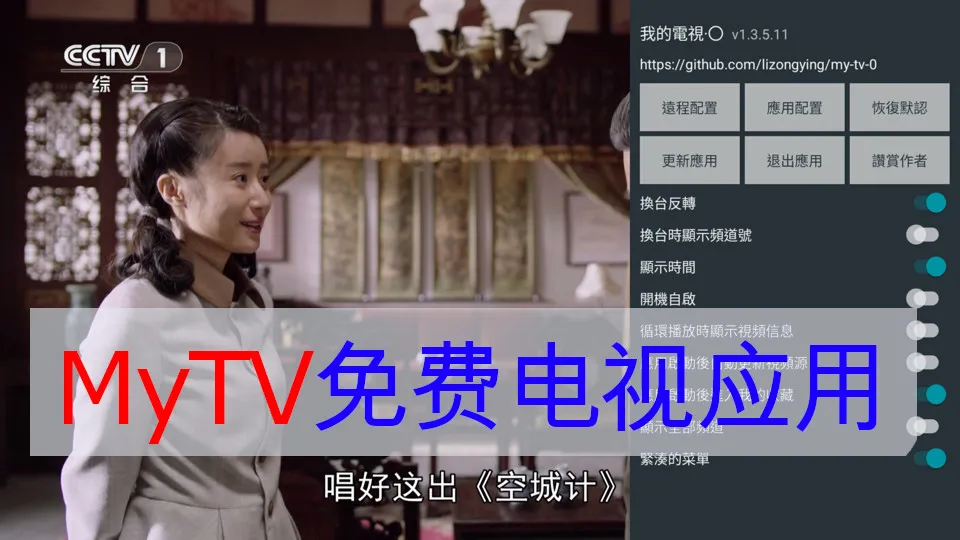
Are you tired of expensive cable TV subscriptions and limited channel choices? Many people are frustrated with the high costs, contracts, and lack of flexibility in traditional TV services. But what if there was a way to watch live TV without these restrictions? This is where "My TV" comes in, a free open-source alternative that lets you control your viewing experience. This blog post will explain what "My TV" is and how it provides a customizable IPTV experience.
What is "My TV"?
"My TV" is a free open-source IPTV software designed for Android devices (especially smart TVs and TV boxes). It allows users to watch live TV channels by importing custom video sources, giving you flexibility in choosing what and how you watch. There are actually two versions: the original "my-tv" and a newer version called "my-tv-0". The "my-tv-0" version has enhanced features such as remote configuration via QR code, making it more user-friendly.
- my-tv GitHub repository: https://github.com/lizongying/my-tv
- my-tv-0 GitHub repository: https://github.com/lizongying/my-tv-0
Features and Characteristics
"My TV"'s core advantage lies in its customizability. Here are some main features:
- Customizable video sources: Users can configure their own video sources, providing flexibility and avoiding dependence on specific providers. This means you won't be locked into specific channels or providers.
- Supported formats: The application supports multiple video source formats, including:
- .txt: A simple text format where each line defines a channel, with group name, #genre#, title, and video URL separated by commas.
- .m3u: A more complex format commonly used for IPTV playlists, including extended channel names, logos, and group titles using #EXTM3U and #EXTINF directives.
- .json: A structured data format that allows defining properties such as "group", "logo", "name", "title", "uris" (video addresses), and headers.
- "my-tv-0" specific features:
- Remote configuration: This version has an important feature for convenient setup via QR code or HTTP address. You can use your phone to scan a QR code to input your custom video source URL. Compared to previous versions, this is a major upgrade as it eliminates the need to manually input long and complex URLs using the TV remote. The text states: "After opening configuration, select remote configuration, scan QR code to configure video sources, etc. You can also directly configure remote address http://0.0.0.0:34567".
- Auto-update: If configured, the application can automatically update video sources on startup. "If video source address is configured and 'update video sources after app startup' is enabled, the application will automatically update video sources after startup".
- Basic playback controls: Both versions allow users to navigate video lists, change channels, and manage favorites using remote control or touchscreen. "Remote left button/touchscreen tap opens video list".
- "my-tv" specific features: The original "my-tv" comes with built-in live sources but also provides a custom interface. "My TV live TV software, ready to use after installation".
Installation Guide
You can install "My TV" on Android TV devices using several methods:
- USB installation: Download the APK file from the GitHub release page and install it using the file manager on Android TV.
- Xiaomi TV Assistant: Xiaomi TV can use its TV Assistant app for installation.
- ADB (Android Debug Bridge): After enabling ADB on your device, use the command
adb install my-tv.apk.
Remember to enable "Install from unknown sources" in your Android settings to allow sideloading applications.
User Experience
"My TV" is generally considered easy to use, with the "my-tv-0" version being particularly convenient due to its QR code configuration. The original "my-tv" version "directly opens CCTV live broadcast". Many users find the software stable and reliable, with one YouTube user calling it the "best version". However, it's important to acknowledge that some devices may experience crashes or instability. Additionally, channel availability and reliability depend on the video sources you use. If you encounter issues, try restarting the application, restoring settings, or reinstalling it. The user interface is primarily in Chinese.
Ethical Considerations and Licensing
"My TV" is open-source software, meaning its source code is open to everyone. This allows transparency, community participation, and free access to media. However, it's important to note that "my-tv" is explicitly licensed for "learning and research" purposes only and may not be used for commercial purposes. Developers warn that it "may terminate at any time" and encourage users to "use cautiously, recommend using official channels for viewing". The software should be deleted within 24 hours after download. Stream reliability depends on video source stability.
Finding Video Sources
The "My TV" app does not come with built-in video sources. You need to find these URLs elsewhere, typically from online forums, repositories, or other online spaces. These sources are third-party, and their reliability can vary greatly.
Future Development
"my-tv" and "my-tv-0" are both actively developed, with frequent releases on GitHub. You can check their respective GitHub pages (links above) for latest updates and "TODO" items. Some planned features include:
- "my-tv-0": Support for playback history, detailed Electronic Program Guide (EPG), light menu theme, handling invalid channels, improved channel list management, default display of channel menu, and remote configuration using WebView.
- "my-tv": Resolve volume inconsistency issues, add specific channels, add soft decoding, and implement auto-update.
Conclusion
"My TV" and its successor version "My TV 0" provide a free and highly customizable way to watch live TV on Android-based devices. The advantage of these projects lies in their flexibility and user control, allowing various video sources. The improvements in "my-tv-0", particularly remote configuration via QR code, address previous limitations and make the process more user-friendly. If you're looking for a free and customizable IPTV solution, try "My TV" and explore its features! If you're interested, consider contributing to the open-source project.